MyFitnessPal

Year

2024

Role

UX Designer (Academic Project)

UX Researcher & Designer (Academic Project)

UX Researcher & Designer (Academic Project)

Tools

Figma

Maze

Project Type

Mobile App Reesign
Details

Details

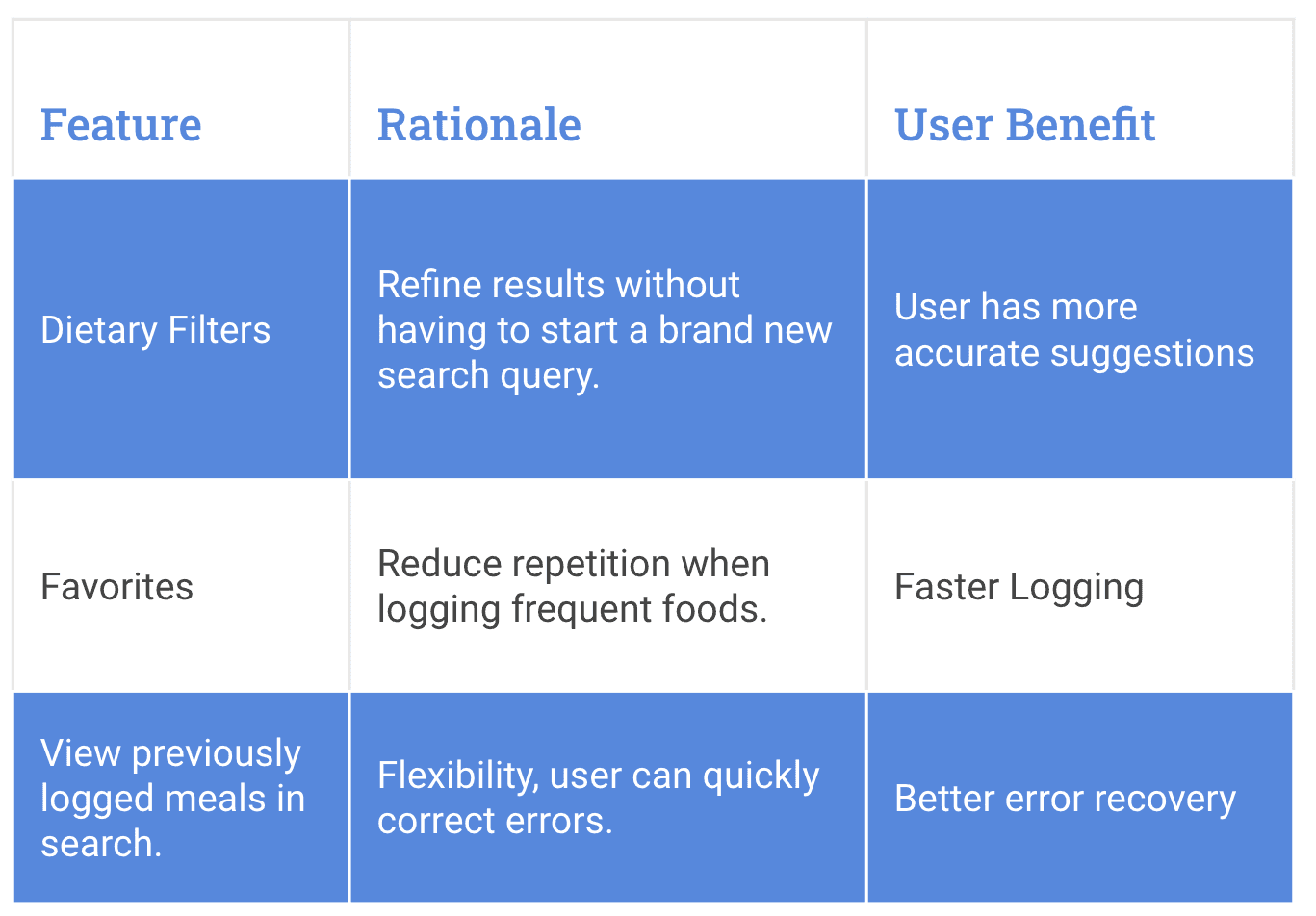
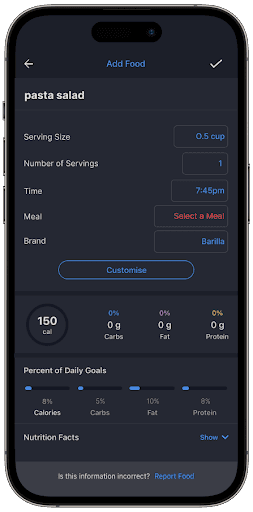
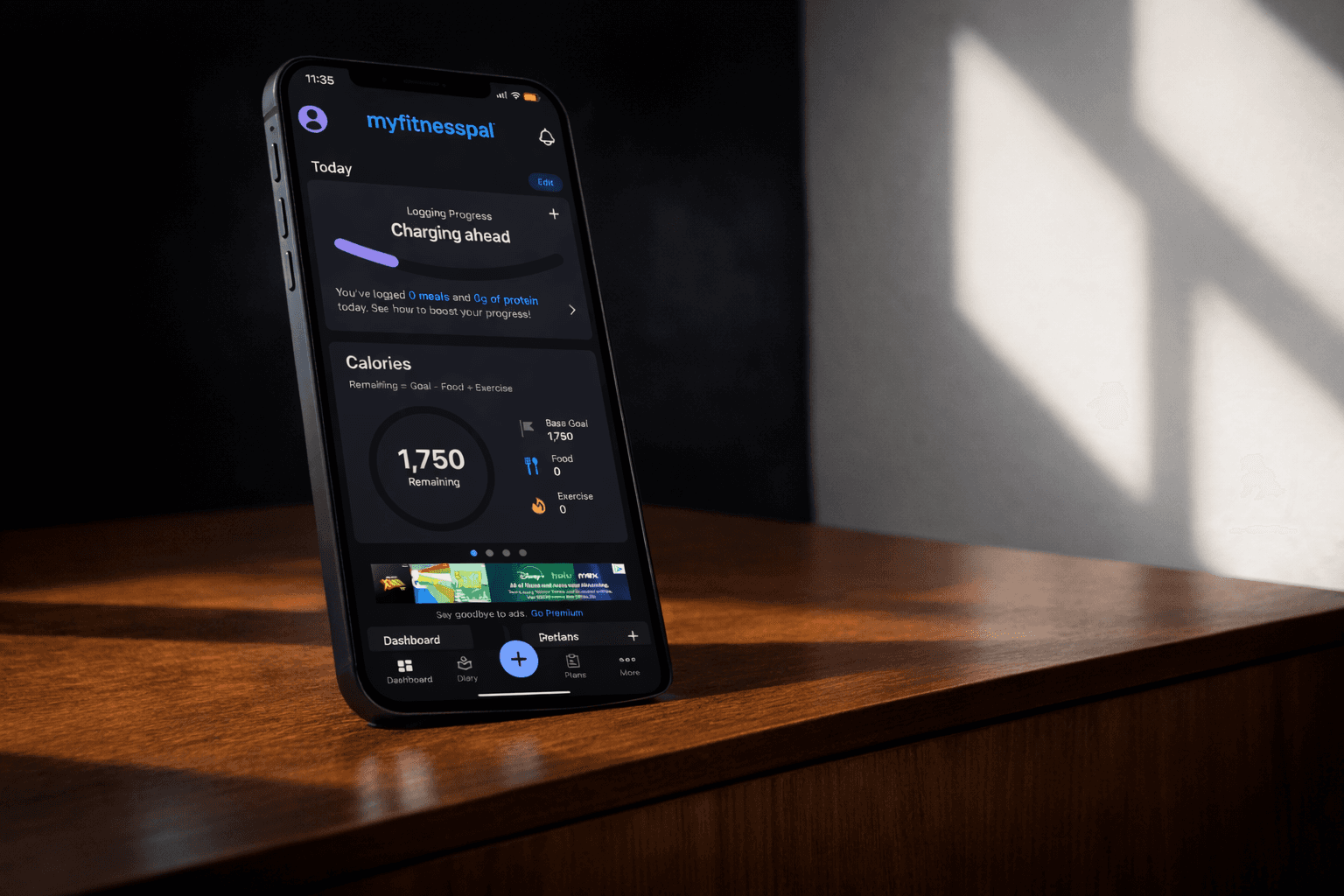
This user-centered redesign improves the MyFitnessPal iOS app by streamlining meal logging with intuitive solutions. Features like Dietary Filters, Favorites, and Recently Logged Meals enhance efficiency, personalization, and ease of use.

This user-centered redesign improves the MyFitnessPal iOS app by streamlining meal logging with intuitive solutions. Features like Dietary Filters, Favorites, and Recently Logged Meals enhance efficiency, personalization, and ease of use.


PROBLEM

MyFitnessPal users are often suggested a lot of inaccurate foods during the meal logging process, causing the user to become confused and overwhelmed by the amount of options.


People who use the MyFitnessPal app several times a day to track their meals have to take many repetitive, making the food tracking tasks time-consuming and inefficient. Image
Background

The MyFitnessPal iOS app is a widely used tool for tracking meals, fitness activities, and overall health. Imagine opening the app to log your meals, only to feel overwhelmed by cluttered interfaces, repetitive tasks, and irrelevant food suggestions. Frustrating, right? That’s exactly the experience many users reported with the MyFitnessPal iOS app. Whether you're a fitness enthusiast trying to track macros or a beginner looking to develop healthier habits, the app's usability challenges often detract from its core purpose: supporting users on their wellness journeys.


Our team saw an opportunity to transform this experience. Through research, design, and iterative testing, we embarked on a mission to redesign MyFitnessPal’s meal-logging process. By addressing user pain points and streamlining interactions, we aimed to create a tool that empowers users to focus on their health goals—not on navigating a complex app. Here’s how we did it.


Research

Key Research goals:

Validate usability issues identified during heuristic evaluation.

Uncover user needs and motivations.

Propose solutions to enhance the user experience.

+

+

+

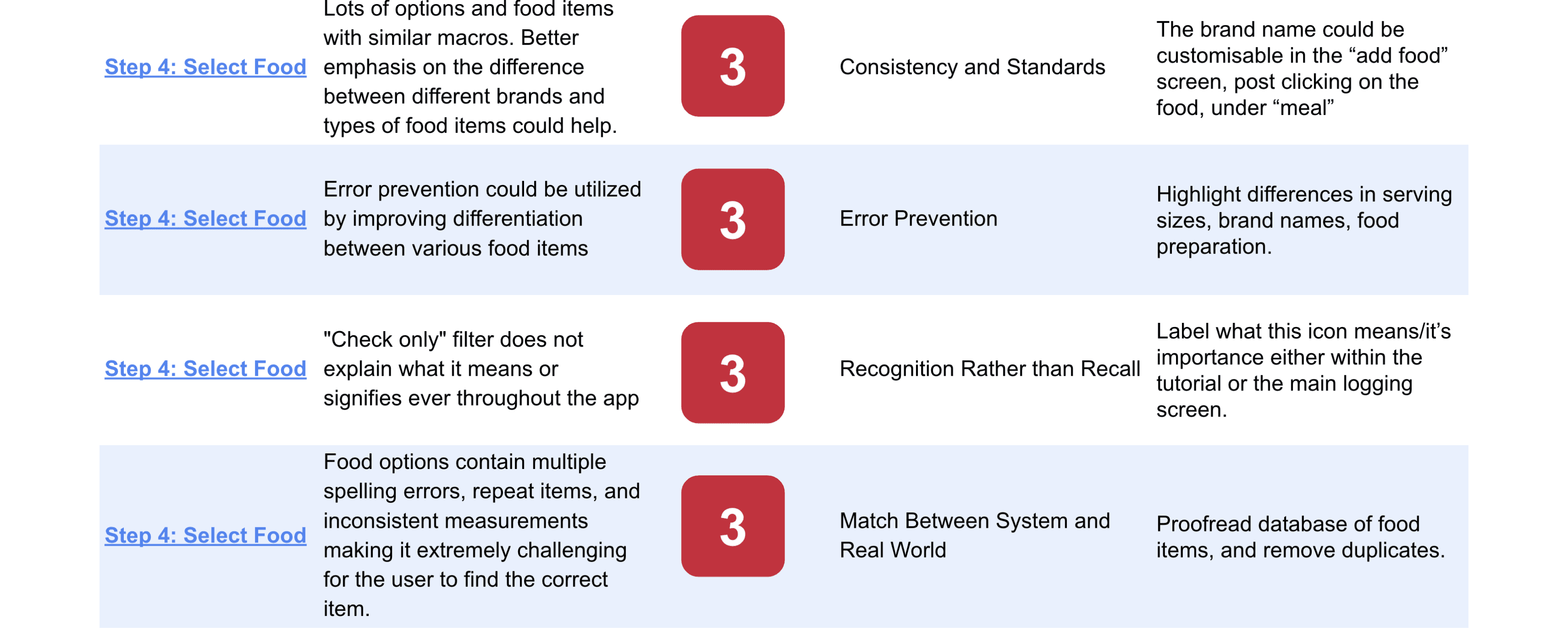
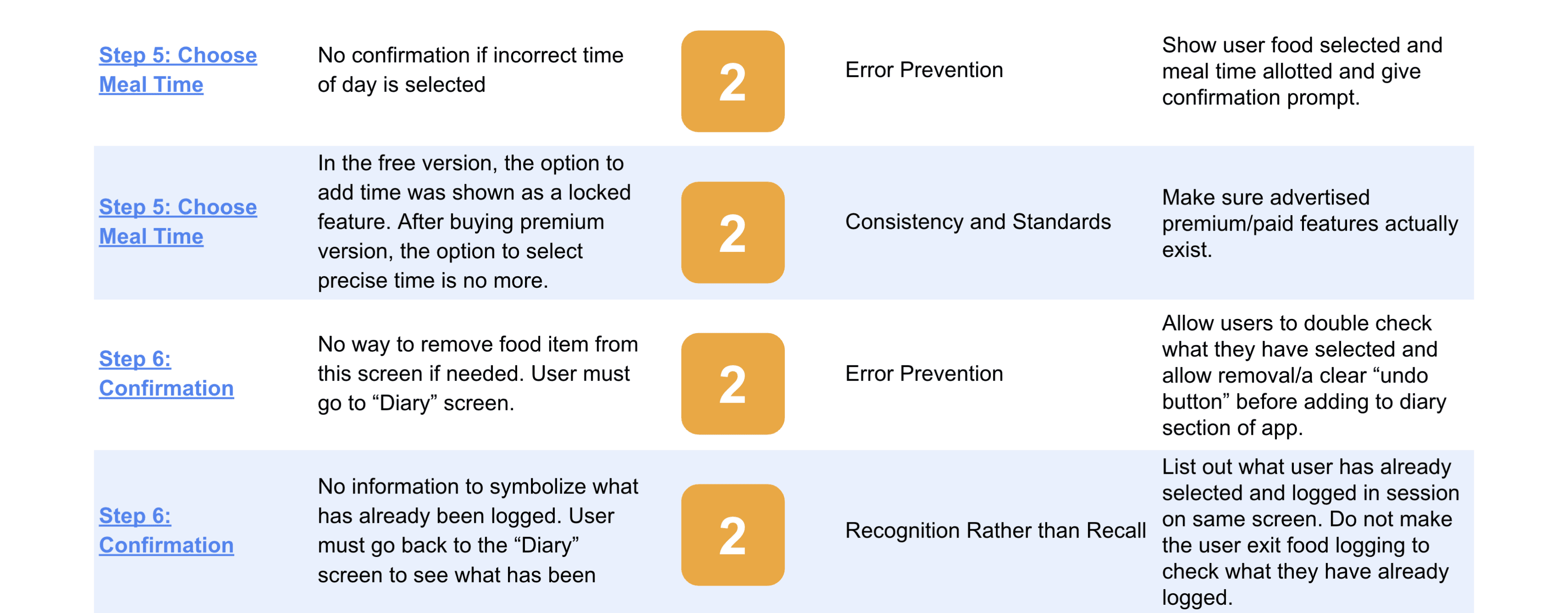
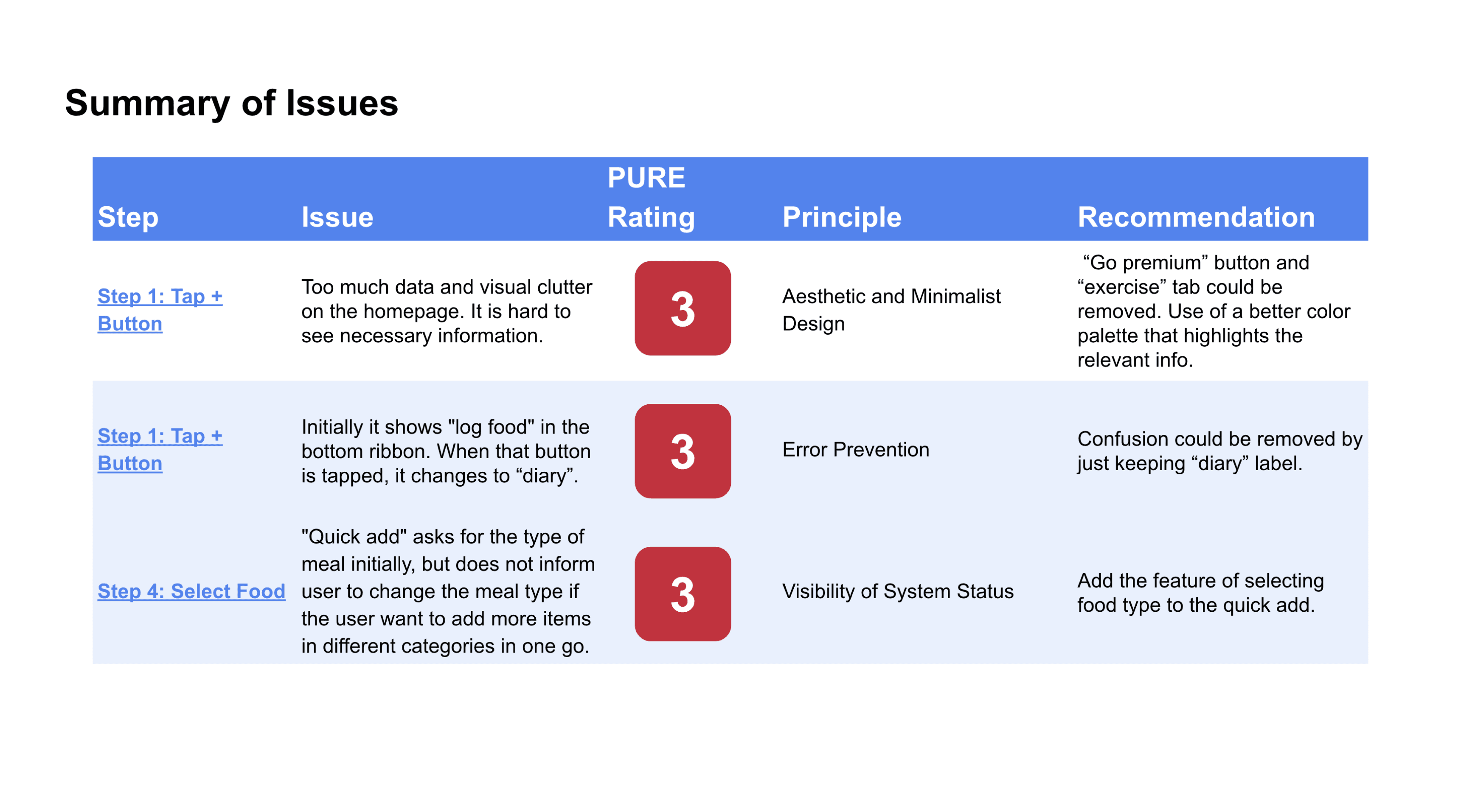
Heuristic Evaluation: Assessed the app against Jakob Nielsen's 10 Usability Heuristics to identify design flaws. We found 12 issues in the meal logging process, with 2 steps identified as difficult for the user to accomplish.


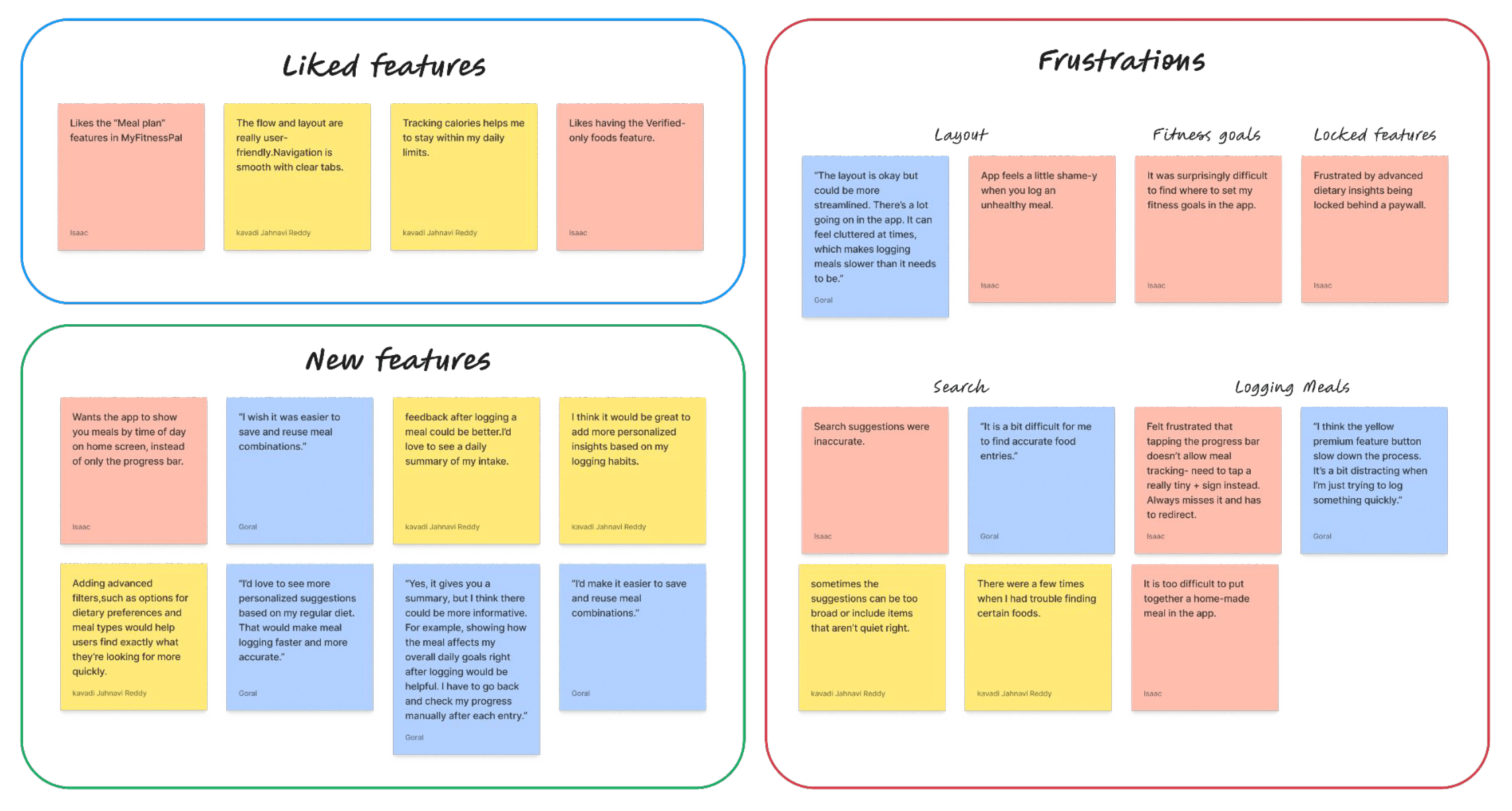
User Interviews: Gathered qualitative data from users to validate findings and uncover unmet needs.


Usability Testing: Conducted with prototypes to gather both qualitative and quantitative feedback on proposed changes.

+

+

+

We used 3 methods to identify design problem and approach:

2

3

1

Fitness Enthusiasts

Active Individuals, 18-35 years old.


Health-conscious Adults

Prioritize Wellness, 25-45 years old.


Fitness Beginners

New to fitness, 18-40 years old.


T A R G E T P A R T I C I P A N T S

Research

Key Research goals:

Validate usability issues identified during heuristic evaluation.

Uncover user needs and motivations.

Propose solutions to enhance the user experience.

+

+

+

Heuristic Evaluation: Assessed the app against Jakob Nielsen's 10 Usability Heuristics to identify design flaws. We found 12 issues in the meal logging process, with 2 steps identified as difficult for the user to accomplish.


User Interviews: Gathered qualitative data from users to validate findings and uncover unmet needs.


Usability Testing: Conducted with prototypes to gather both qualitative and quantitative feedback on proposed changes.

+

+

+

We used 3 methods to identify design problem and approach:

2

3

1

Fitness Enthusiasts

Active Individuals, 18-35 years old.


Health-conscious Adults

Prioritize Wellness, 25-45 years old.


Fitness Beginners

New to fitness, 18-40 years old.


T A R G E T P A R T I C I P A N T S

Research

Key Research goals:

Validate usability issues identified during heuristic evaluation.

Uncover user needs and motivations.

Propose solutions to enhance the user experience.

+

+

+

Heuristic Evaluation: Assessed the app against Jakob Nielsen's 10 Usability Heuristics to identify design flaws. We found 12 issues in the meal logging process, with 2 steps identified as difficult for the user to accomplish.


User Interviews: Gathered qualitative data from users to validate findings and uncover unmet needs.


Usability Testing: Conducted with prototypes to gather both qualitative and quantitative feedback on proposed changes.

+

+

+

We used 3 methods to identify design problem and approach:

2

3

1

Fitness Enthusiasts

Active Individuals, 18-35 years old.


Health-conscious Adults

Prioritize Wellness, 25-45 years old.


Fitness Beginners

New to fitness, 18-40 years old.


T A R G E T P A R T I C I P A N T S

We conducted 3 interviews with active MyFitnessPal users to gather insights into their experiences, ALONG WITH THIER CONSENT.


Suggestions for improving app functionality

Feedback on MyFitnessPal's meal logging process

Meal tracking experiences and challenges

Features and usability of health apps

+

+

+

+

+

+

+

We asked questions about:

We conducted 3 interviews with active MyFitnessPal users to gather insights into their experiences, ALONG WITH THIER CONSENT.


Suggestions for improving app functionality

Feedback on MyFitnessPal's meal logging

process

Meal tracking experiences and challenges

Features and usability of health apps

+

+

+

+

+

+

+

We asked questions about:

We conducted 3 interviews with active MyFitnessPal users to gather insights into their experiences, ALONG WITH THIER CONSENT.


Suggestions for improving app

functionality

Feedback on MyFitnessPal's meal logging

process

Meal tracking experiences and challenges

Features and usability of health apps

+

+

+

+

+

+

+

We asked questions about:

H E U R I S T I C E V A L U A T I O N
A F F I N I T Y M A P P I N G
RESEARCH INSIGHTS

Complex Flow

Users struggled with the meal logging process for homemade meals. It was a long and repetitive process.


Inconsistent Suggestions

Large food database often suggested incorrect or inaccurate foods.


Lack of Personalization

Users wished to customize the app to match their needs more.

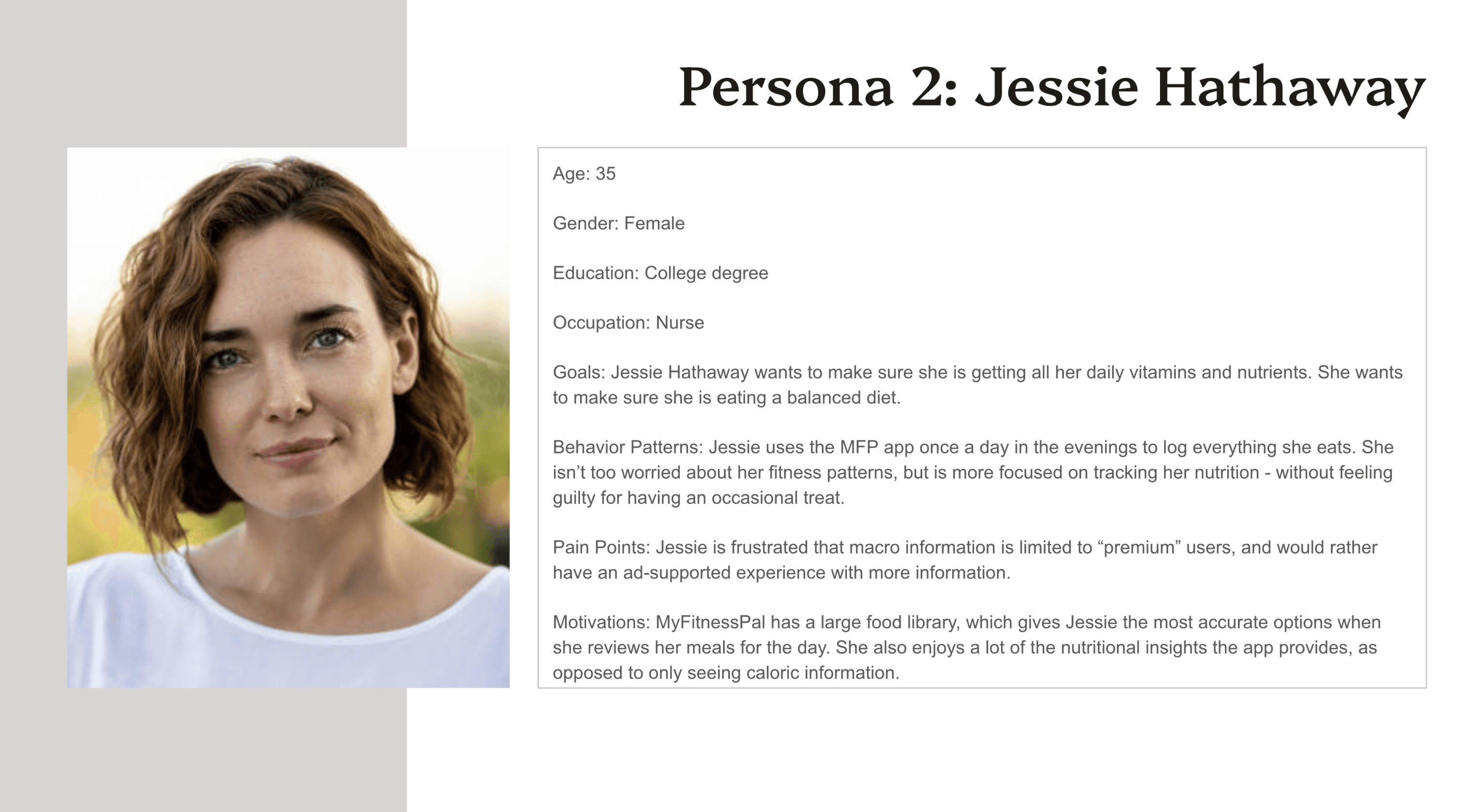
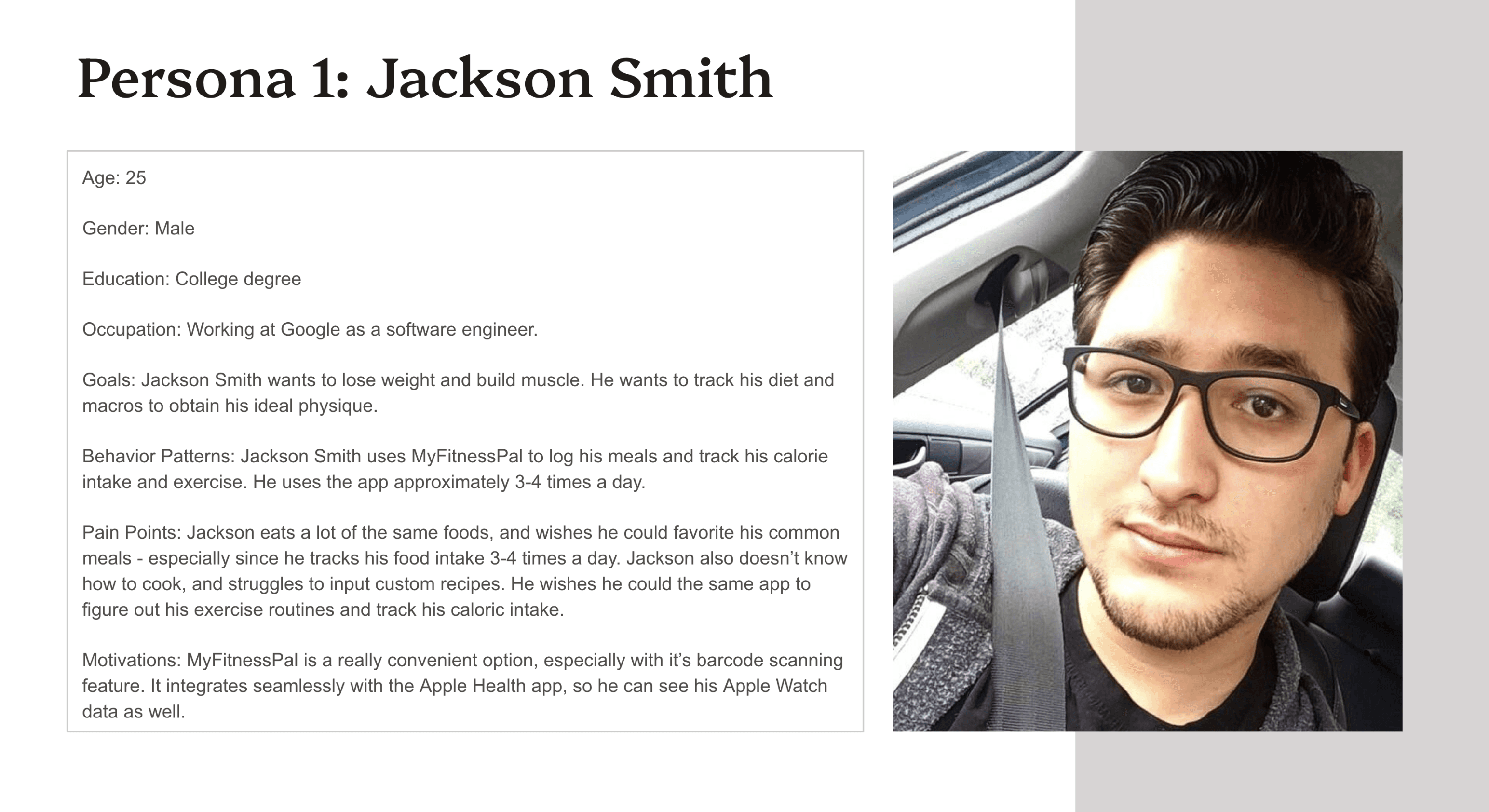
PERSONA
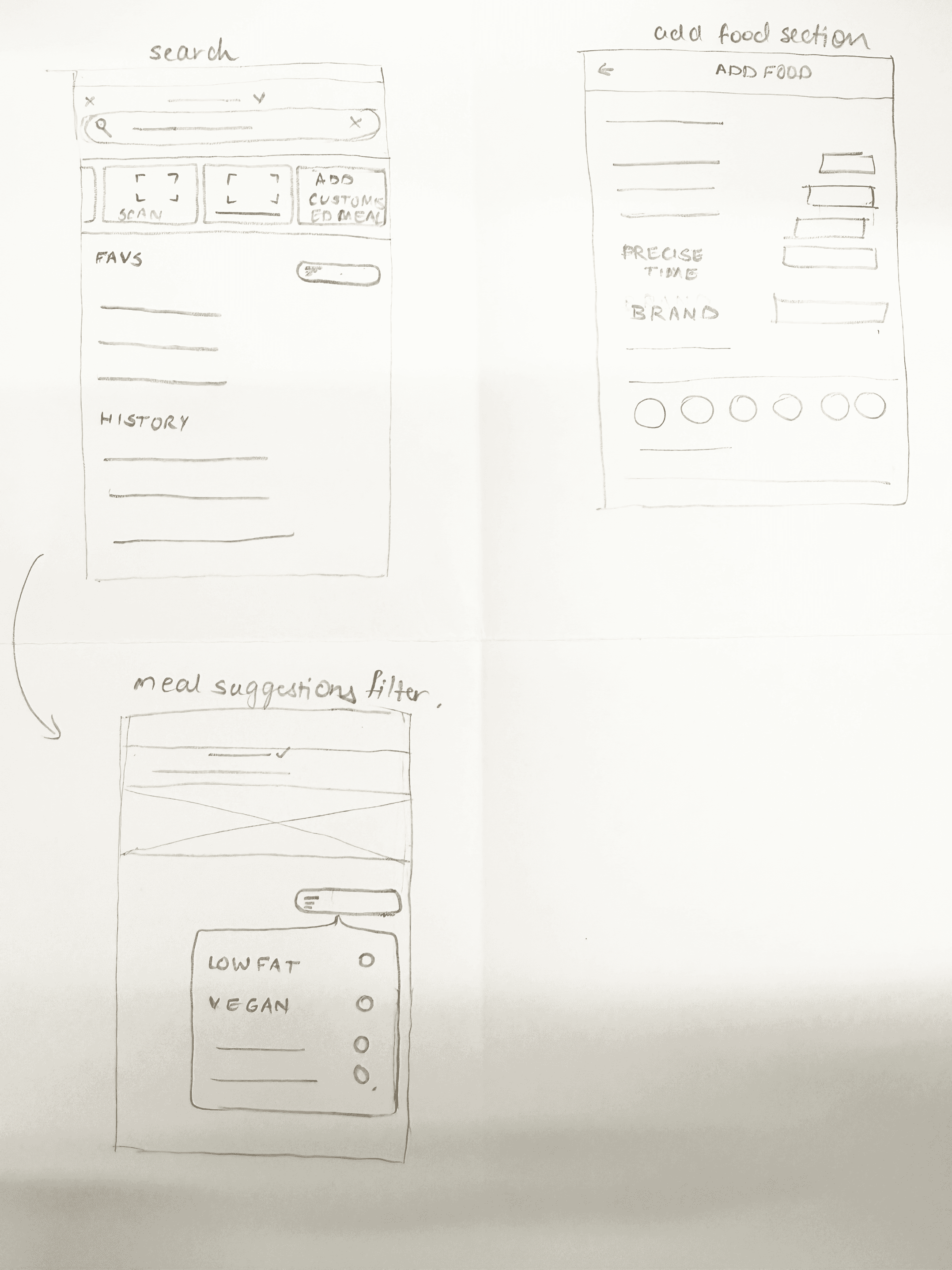
WIREFRAMES

WIREFRAMES

WIREFRAMES

WIREFRAMES

KEY DESIGN DECISIONS

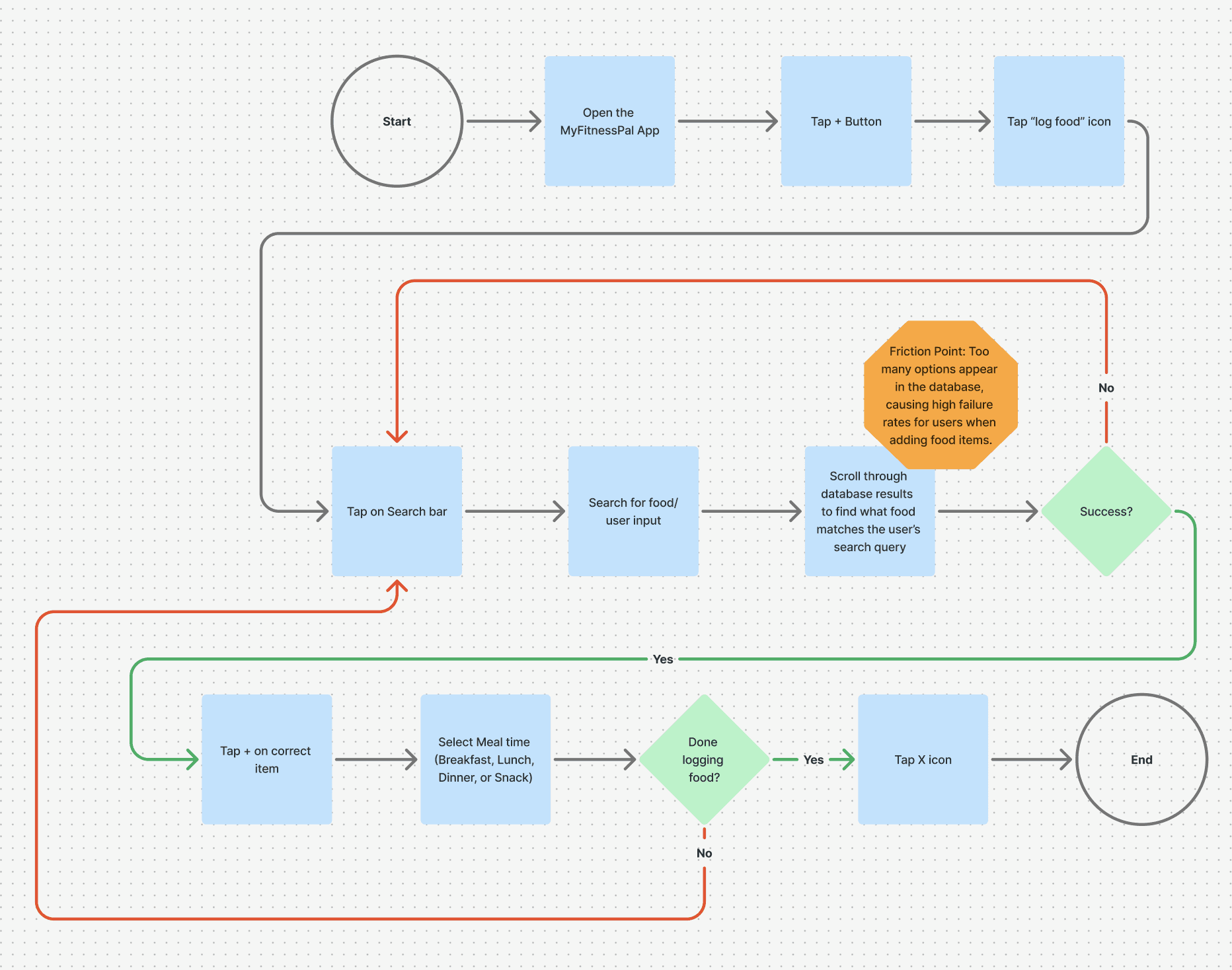
OLD USER JOURNEY

OLD USER JOURNEY

OLD USER JOURNEY

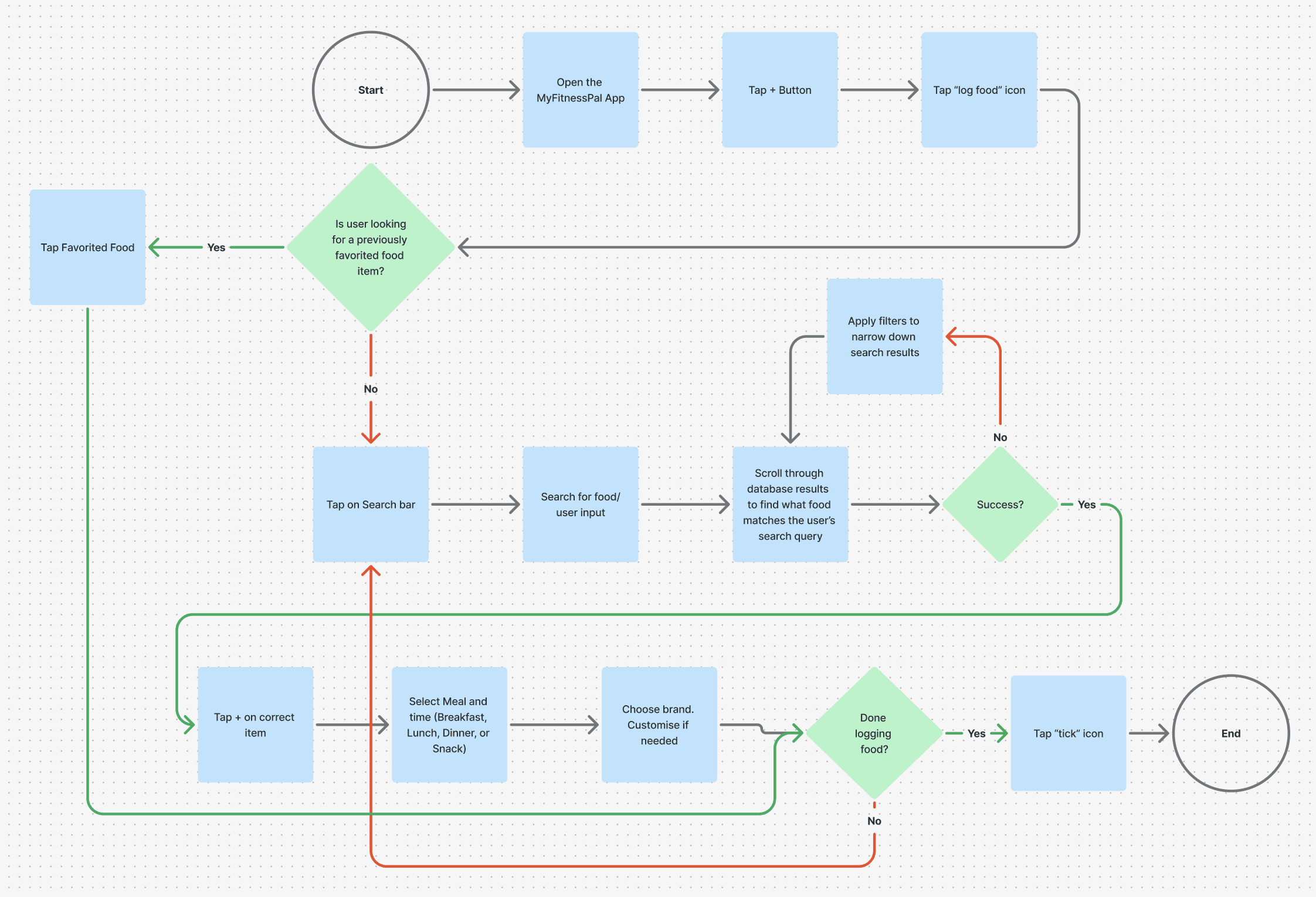
NEW USER JOURNEY

NEW USER JOURNEY

NEW USER JOURNEY

Key Features Redesign

Key Features Redesign

Transforming Meal Logging with User-Centered Design

Transforming Meal Logging with User-Centered Design

H I G H F I D I L I T Y L A Y O U T S

H I G H F I D I L I T Y L A Y O U T S

H I G H F I D I L I T Y L A Y O U T S

A L T E R N A T I V E L A Y O U T S

A L T E R N A T I V E L A Y O U T S

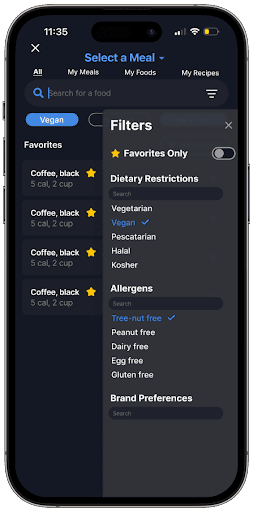
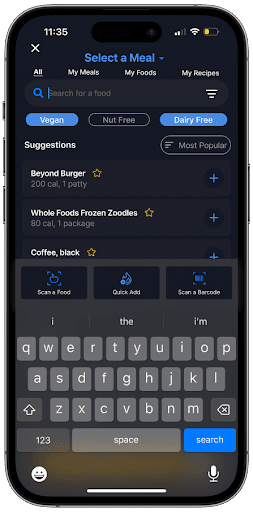
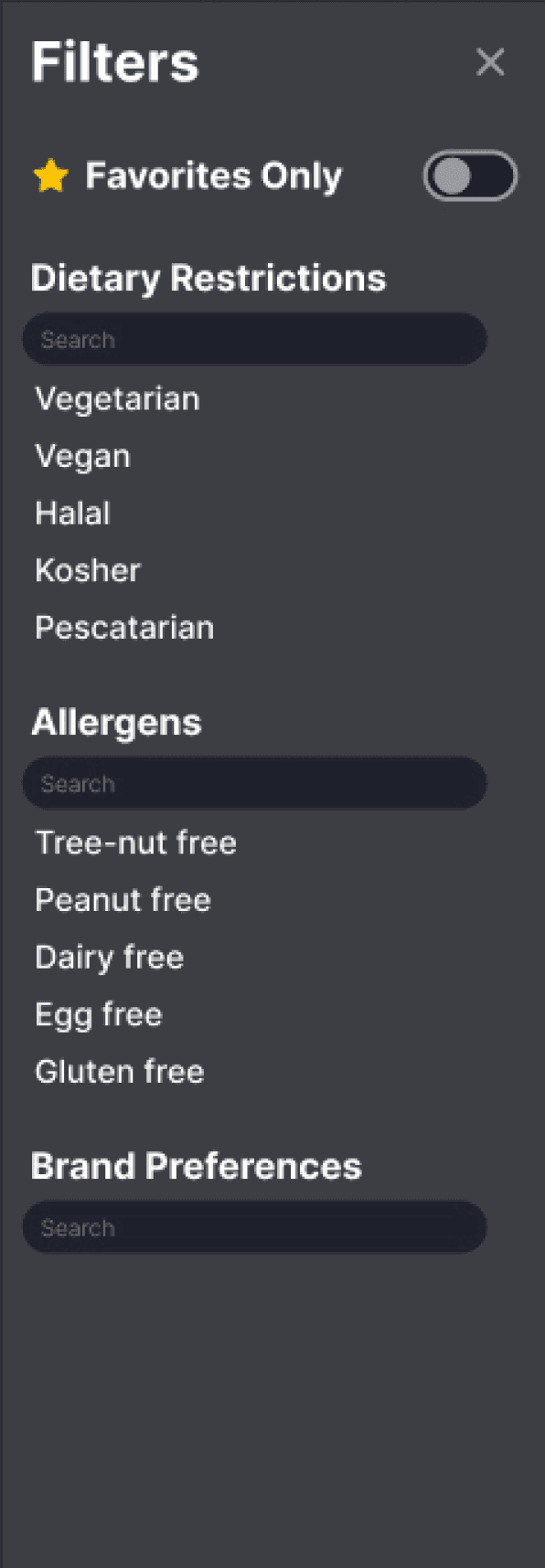
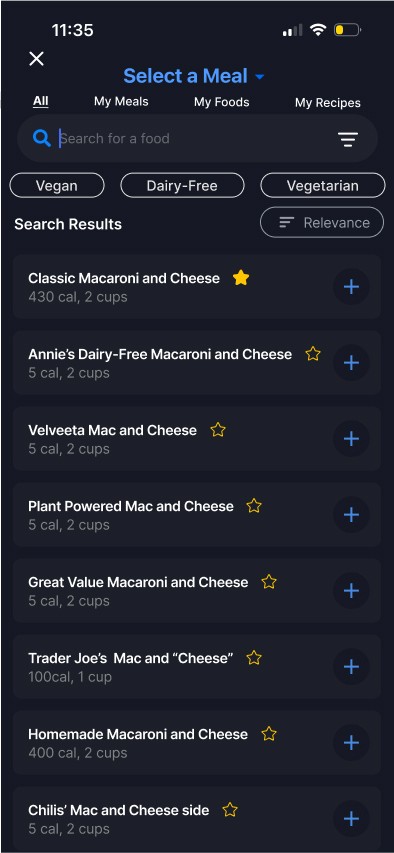
Users often struggled with irrelevant and overwhelming food suggestions. To solve this, we introduced Dietary Filters—a feature that allows users to refine search results based on preferences like vegetarian, vegan, or low-carb options.


Why It Matters:
By personalizing search results, users can quickly find meals that match their dietary needs without sifting through unnecessary options. This makes the meal-logging process not just faster but also more relevant.


Principles:

Recognition Rather Than Recall: By allowing users to filter dietary preferences, they don't need to remember and input the same search repeatedly. The interface keeps necessary options visible and easily accessible.

Consistency and Standards: Filters align with common user expectations for search functionality across platforms.

Prototype: Dietary Filters

Prototype: Dietary Filters

Dietary Filters: Personalization at Your Fingertips
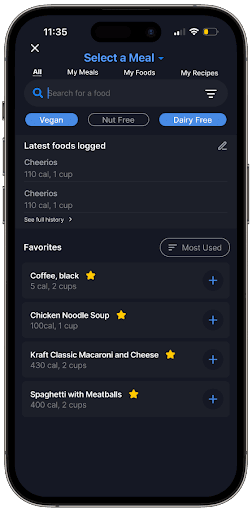
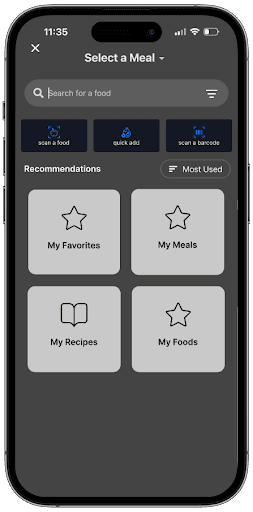
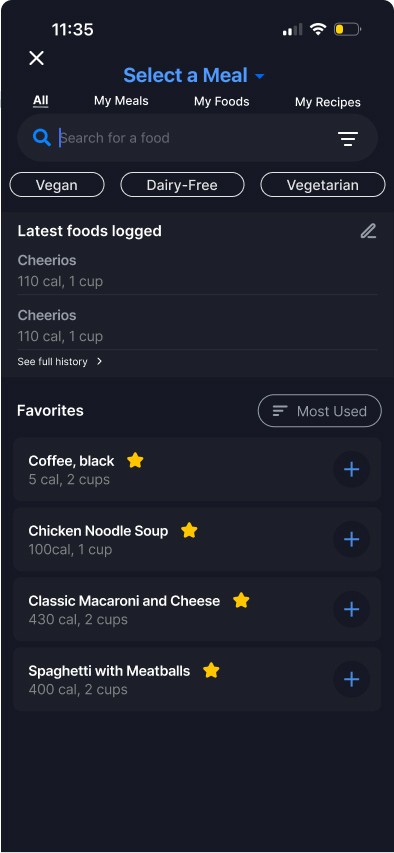
Frequent users of MyFitnessPal often log the same meals daily, making the process repetitive. Our Favorites feature now lets users save their most commonly logged meals for quick access.


Why It Matters:
By reducing the need for repetitive searches, this feature saves time and creates a smoother experience for users who track their diets consistently.


Principles:

Flexibility and Efficiency of Use: Catering to experienced users who repeatedly log the same meals, this feature acts as a shortcut, improving task efficiency.

Feedback: By allowing users to mark meals as favorites, the system provides confirmation of a streamlined process for future actions.

Prototype: Favourites

Prototype: Favourites

Favorites: Simplifying Repetitive Tasks
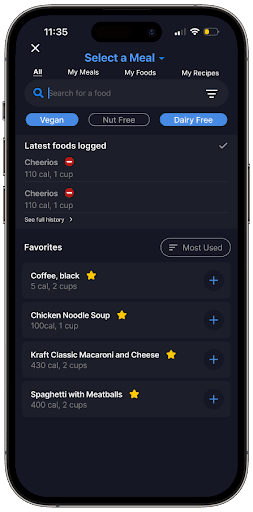
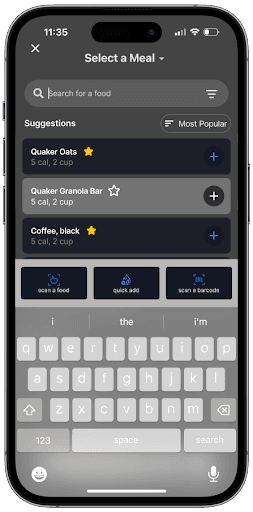
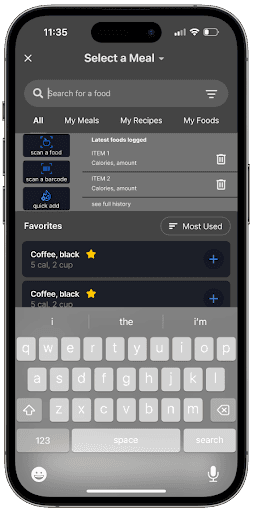
Previously, users had to search manually for meals they had logged before. Now, the app displays a Recently Logged Meals section within the search interface for easy access.


Why It Matters:
This feature eliminates the need for redundant searches, allowing users to find and log meals they’ve already added with just one tap.


Principles:

Error Recovery and Feedback: Displaying past entries ensures users can easily undo or modify their actions without starting from scratch, bridging the evaluation gap.

Recognition Rather Than Recall: Makes prior actions visible, eliminating the need for users to remember meal details.

View Previously Logged Meals in Search: Context and Convenience
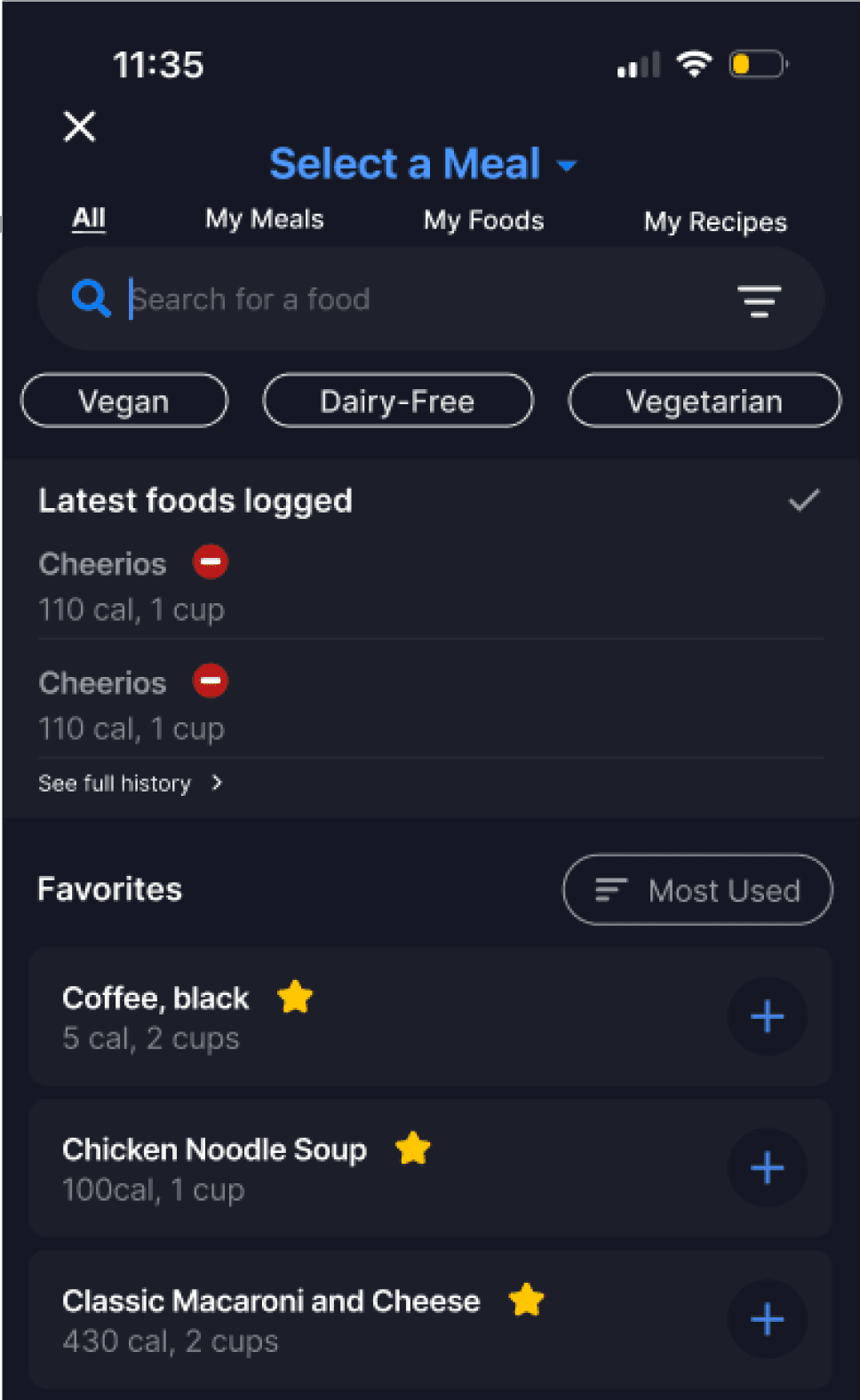
Prototype: Logged Food

Prototype: Logged Food

Usability Testing

Usability Testing

The study seeks to evaluate the usability and effectiveness of the meal logging process for MyFitnessPal IOS App. Our goal is to identify user experience challenges, collect feedback, and implement data-driven enhancements to improve the platform's overall usability and user satisfaction.


PROTOCOL:


Where and How

The study was conducted in moderated format, either in-person or remotely using tools like Zoom or Google Meet.
Maze was used to conduct usability testing and Google Forms for post survey questions.
Participants were asked to share their screens while interacting with the app.
Retrospective Probing was utilized to get participants feedback after completing each task.
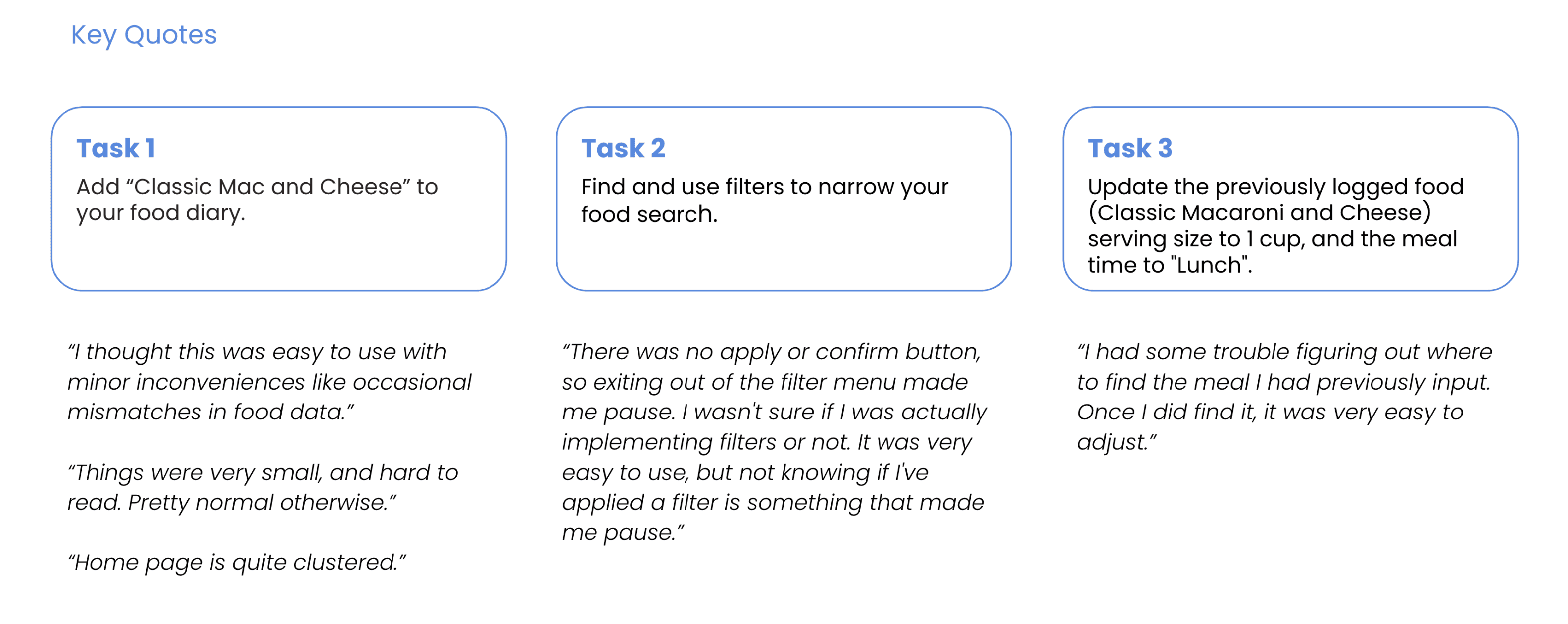
Q U A L I T A T I V E D A T A

Q U A L I T A T I V E D A T A

  • Adjust the apps landing page so previously logged meals are more easily accessible. 

    • Removal of “+” sign from process logging widget: 

    • Removing  the “+” sign from “logging process” widget would help eliminate the confusion for adding meals.


  • Adjust upper “Edit” button to be more clear. Ex. “Edit Layout” or “Edit Settings”.

    • This was also another pain point that was confusing for users when trying to edit previously logged meals. 


  • Add a confirmation button in the filters tab.

  • Try to improve font size and legibility if possible.

  • Change “diary” to “logged food” or “logs”.

    • This is where users felt most confused in the task. Simply renaming the label would reduce cognitive load.


A N A L Y S I S

R E C O M M E N D A T I O N S

Insights


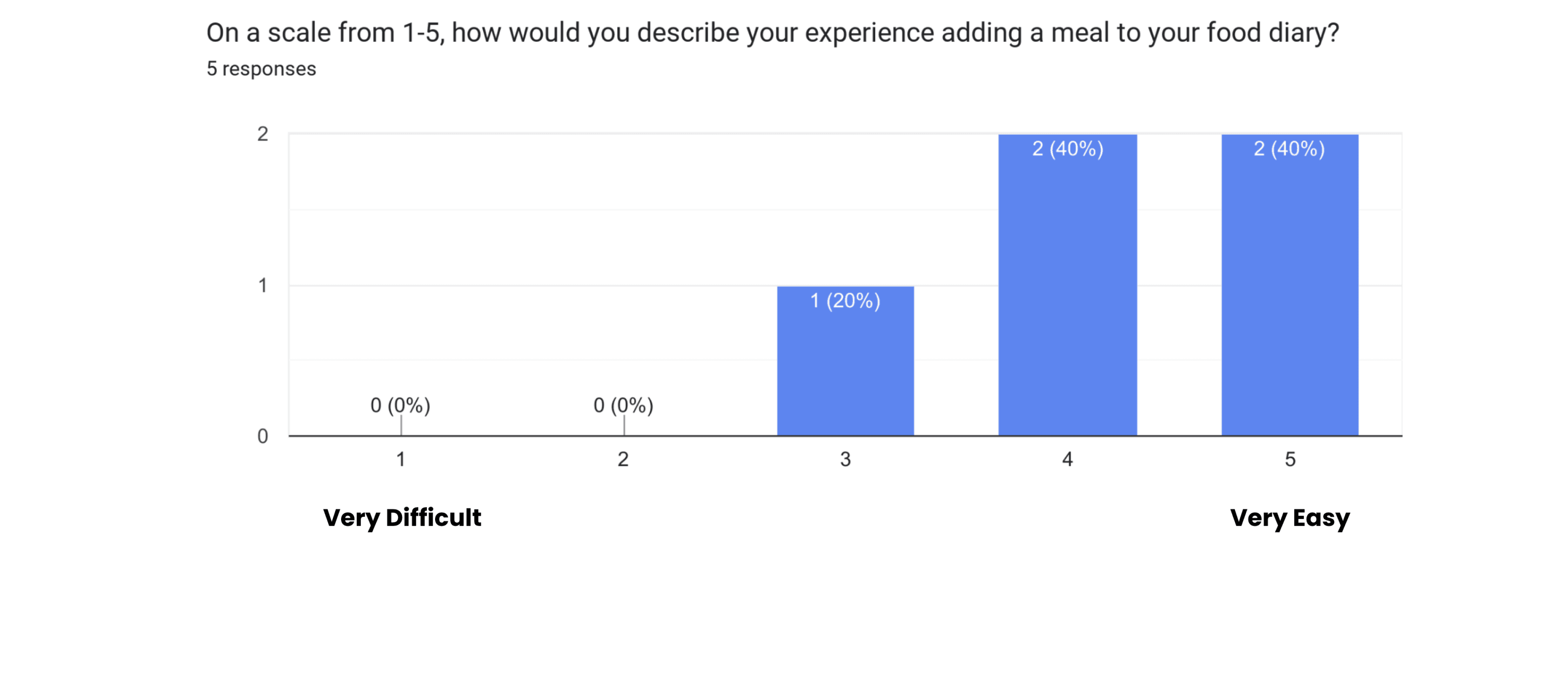
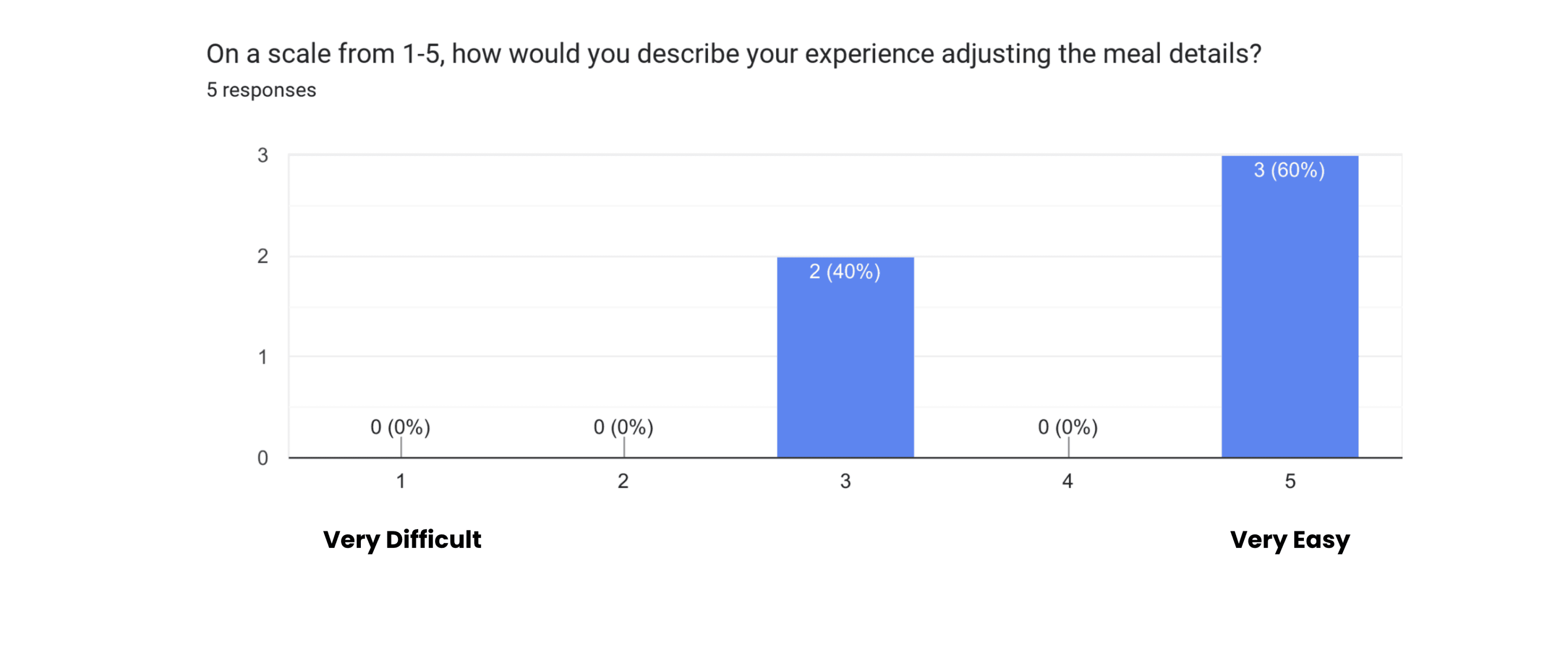
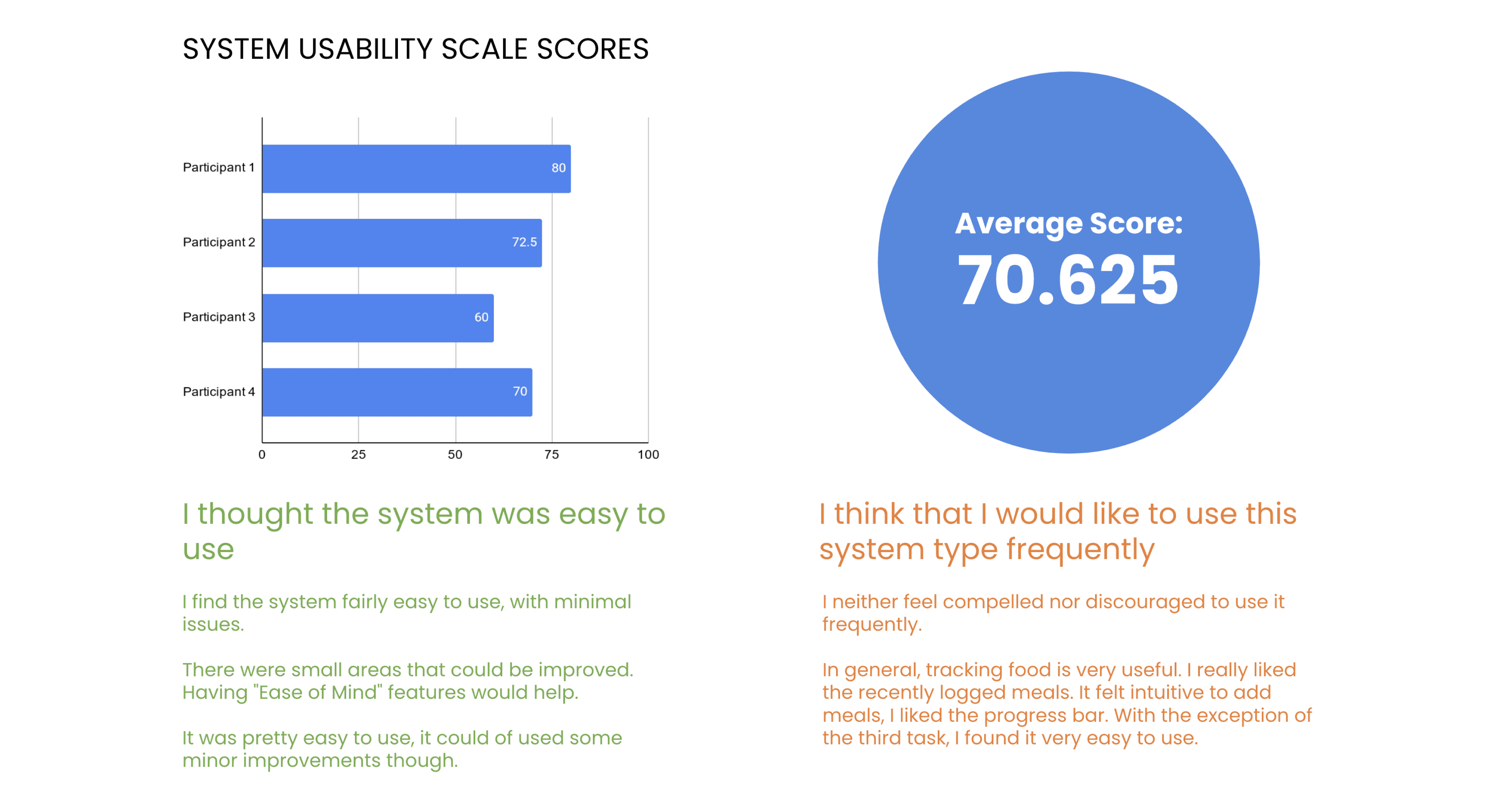
  • Users thought the app was overall easy to use, and fairly understandable.

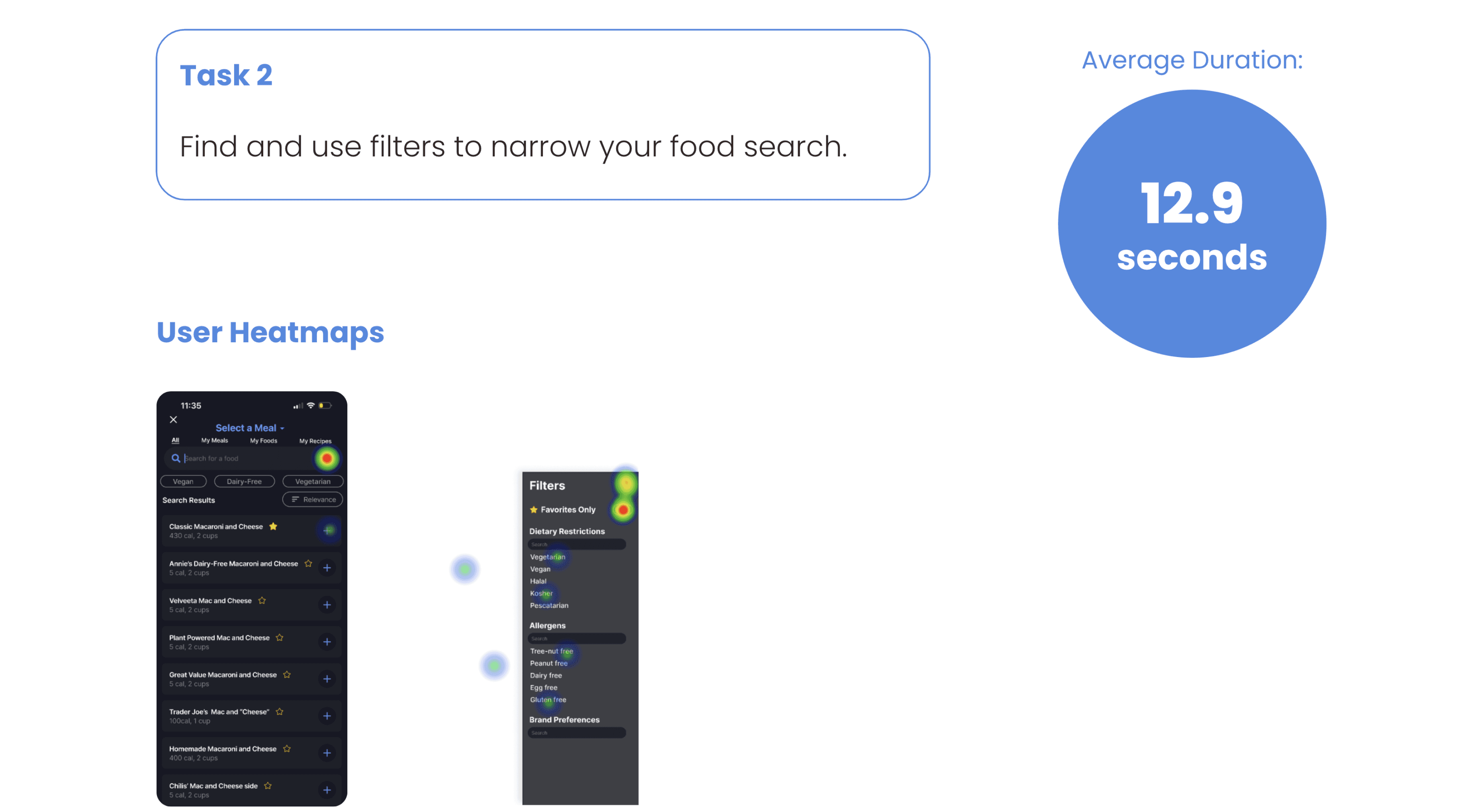
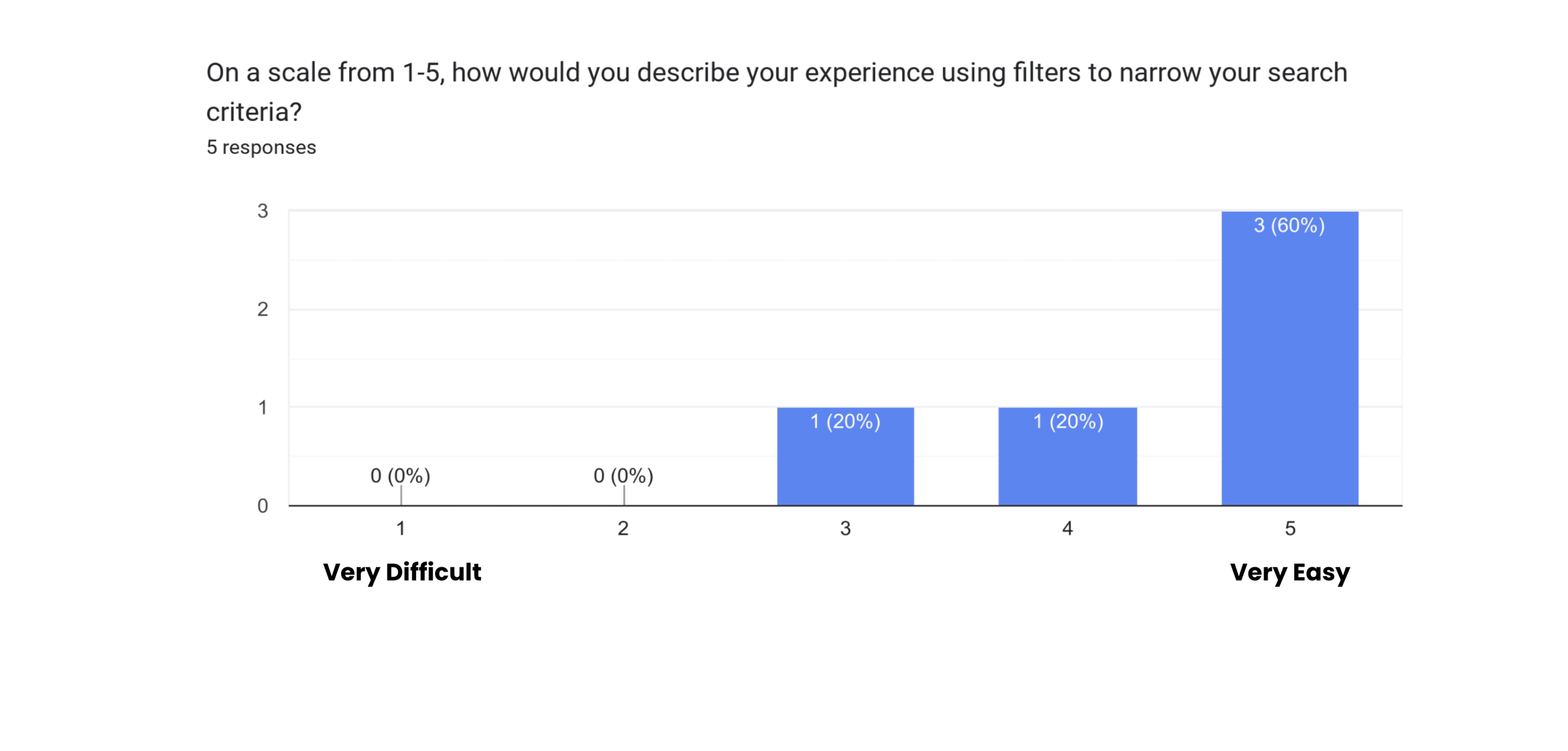
  • Users liked the flexibility of using filters and the option of editing their previously added meals. 

  • Users did not really use the “quick filter” tabs. 

  • The average SUS score is just barely above 70. While this is “passing” we can utilize both the quantitative and qualitative data to help inform our next steps to improve the user experience. 


Pain Points

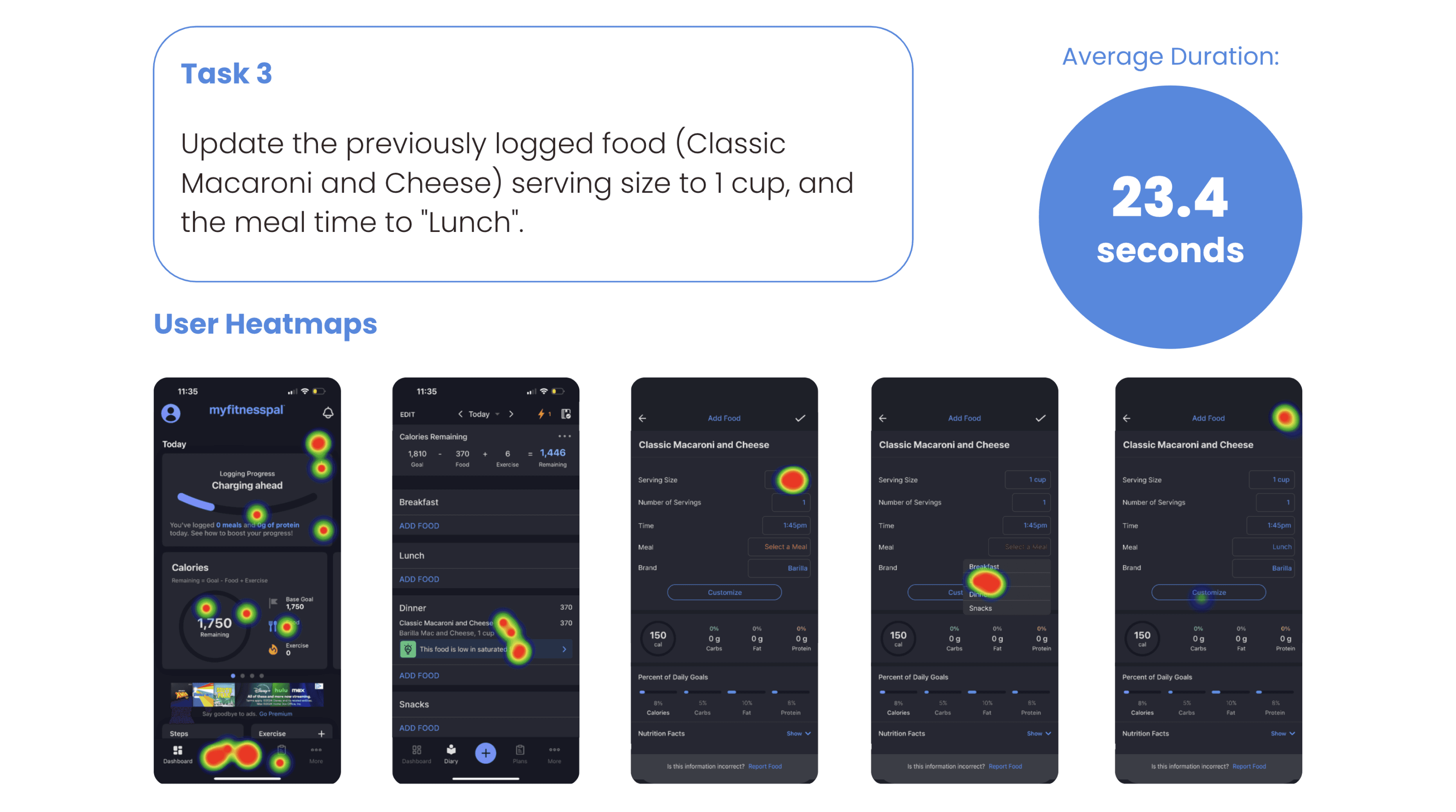
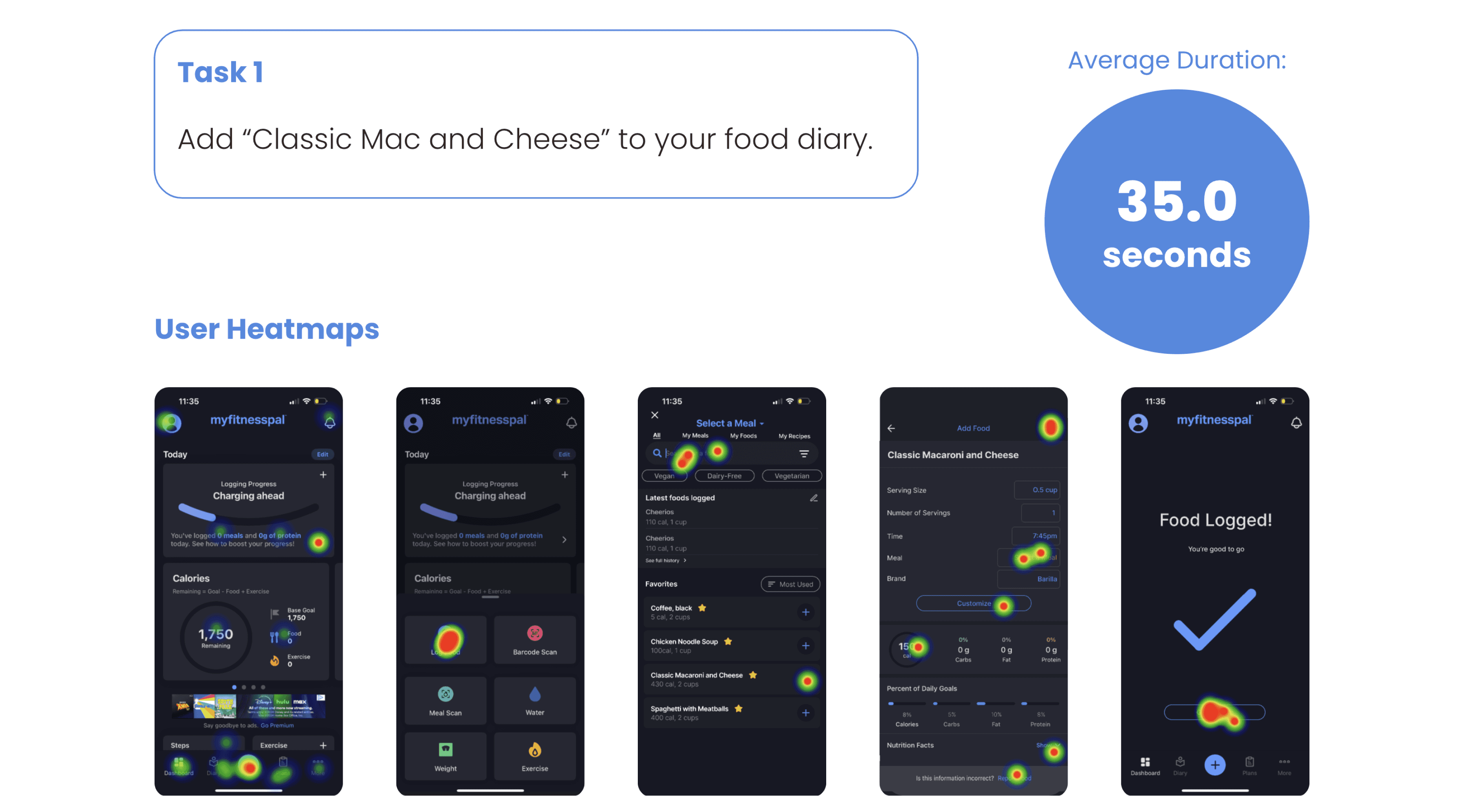
  • Users struggled the most with editing previously logged meals. 

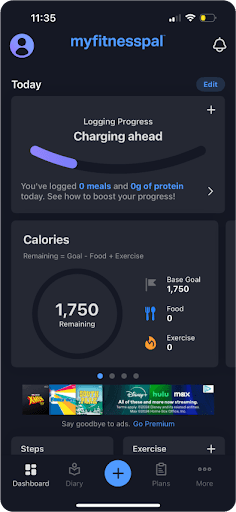
  • Users did not know how to access the food that they logged previously. Heatmaps showed that users tried multiple “edit” buttons on the landing page of the app before navigating to the “Diary” tab. 

  • Users wished for more system feedback to ensure their actions were registered.

  • Adjust the apps landing page so previously logged meals are more easily accessible. 

    • Removal of “+” sign from process logging widget: 

    • Removing  the “+” sign from “logging process” widget would help eliminate the confusion for adding meals.

  • Adjust upper “Edit” button to be more clear. Ex. “Edit Layout” or “Edit Settings”.

    • This was also another pain point that was confusing for users when trying to edit previously logged meals. 

  • Add a confirmation button in the filters tab.

  • Try to improve font size and legibility if possible.

  • Change “diary” to “logged food” or “logs”.

    • This is where users felt most confused in the task. Simply renaming the label would reduce cognitive load.

  • Adjust the apps landing page so previously logged meals are more easily accessible. 

    • Removal of “+” sign from process logging widget: 

    • Removing  the “+” sign from “logging process” widget would help eliminate the confusion for adding meals.

  • Adjust upper “Edit” button to be more clear. Ex. “Edit Layout” or “Edit Settings”.

    • This was also another pain point that was confusing for users when trying to edit previously logged meals. 

  • Add a confirmation button in the filters tab.

  • Try to improve font size and legibility if possible.

  • Change “diary” to “logged food” or “logs”.

    • This is where users felt most confused in the task. Simply renaming the label would reduce cognitive load.

  • Adjust the apps landing page so previously logged meals are more easily accessible. 

    • Removal of “+” sign from process logging widget: 

    • Removing  the “+” sign from “logging process” widget would help eliminate the confusion for adding meals.

  • Adjust upper “Edit” button to be more clear. Ex. “Edit Layout” or “Edit Settings”.

    • This was also another pain point that was confusing for users when trying to edit previously logged meals. 

  • Add a confirmation button in the filters tab.

  • Try to improve font size and legibility if possible.

  • Change “diary” to “logged food” or “logs”.

    • This is where users felt most confused in the task. Simply renaming the label would reduce cognitive load.

R E C O M M E N D A T I O N S

Prototype: Suggested Recommendations

Prototype: Suggested Recommendations

A N A L Y S I S

A N A L Y S I S

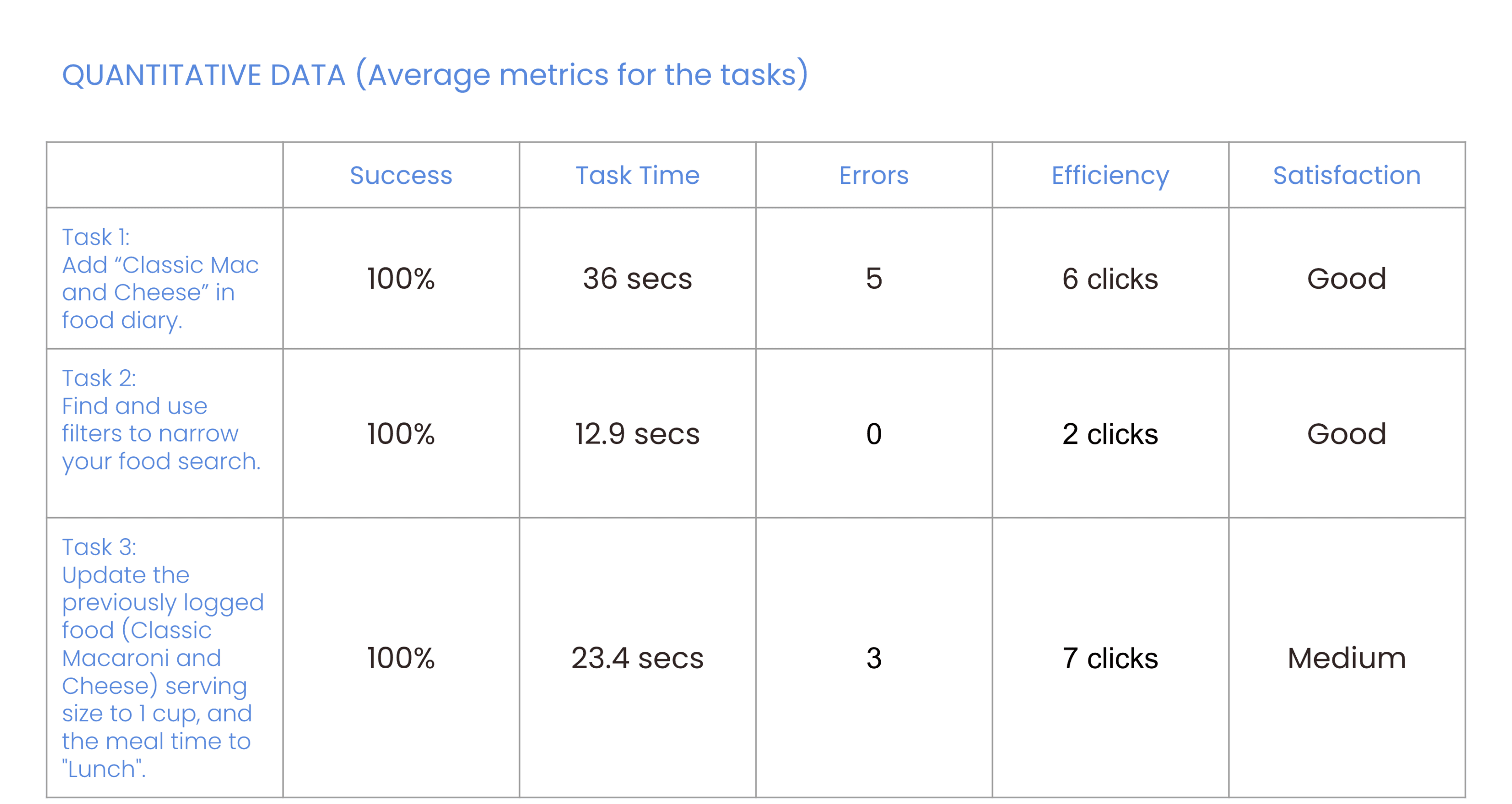
Q U A N T I T I V E D A T A

Analysis

Q U A N T I T I V E D A T A

P R O T O T Y P E

REFLECTING ON THE OVERALL SUCCESS OF THE PROJECT AND USER-CENTERED DESIGN


The redesign of the MyFitnessPal iOS app's meal-logging process successfully addressed critical usability challenges by implementing user-centered design principles and iterative testing.

REFLECTING ON THE OVERALL SUCCESS OF THE PROJECT AND USER-CENTERED DESIGN


The redesign of the MyFitnessPal iOS app's meal-logging process successfully addressed critical usability challenges by implementing user-centered design principles and iterative testing.

Importance of User-Centered Design

The success of the project underscores the vital role of user-centered design in addressing usability challenges and improving the user experience:


Empathy and Understanding: User research uncovered real frustrations and needs.


Principle-Driven Solutions: Applied usability heuristics to address core design issues.


Iterative and Collaborative Process: Continuous testing and feedback refined the design.


Enhancing the User Journey: Simplified and intuitive interactions improved the experience.

Importance of User-Centered Design

The success of the project underscores the vital role of user-centered design in addressing usability challenges and improving the user experience:


Empathy and Understanding: User research uncovered real frustrations and needs.


Principle-Driven Solutions: Applied usability heuristics to address core design issues.


Iterative and Collaborative Process: Continuous testing and feedback refined the design.


Enhancing the User Journey: Simplified and intuitive interactions improved the experience.

Importance of User-Centered Design

The success of the project underscores the vital role of user-centered design in addressing usability challenges and improving the user experience:


Empathy and Understanding: User research uncovered real frustrations and needs.


Principle-Driven Solutions: Applied usability heuristics to address core design issues.


Iterative and Collaborative Process: Continuous testing and feedback refined the design.


Enhancing the User Journey: Simplified and intuitive interactions improved the experience.

Project Success in Meeting Objectives
Simplifying the User Journey:
Streamlined workflows with Dietary Filters, Favorites, and Recently Logged Meals; improved SUS score > 70.


Addressing Key Pain Points:
Solved issues like inaccurate suggestions; improved error recovery and visibility.


Iterative Testing for Validation:
Testing confirmed design effectiveness and user satisfaction.

Simplifying the User Journey:
Streamlined workflows with Dietary Filters, Favorites, and Recently Logged Meals; improved SUS score > 70.


Addressing Key Pain Points:
Solved issues like inaccurate suggestions; improved error recovery and visibility.


Iterative Testing for Validation:
Testing confirmed design effectiveness and user satisfaction.

Final Thoughts!

This project showed how focusing on user needs can turn usability challenges into opportunities for creativity and improvement. By putting users at the heart of the design process and drawing on meaningful research insights, the redesign not only made the app easier to use but also helped users feel more confident and satisfied. It reinforced the app’s role as a trusted partner in supporting their wellness journey.